Building Asynchronous AI Copilots: Inside the Tech Stack of a Video Interview Assistant
Introduction
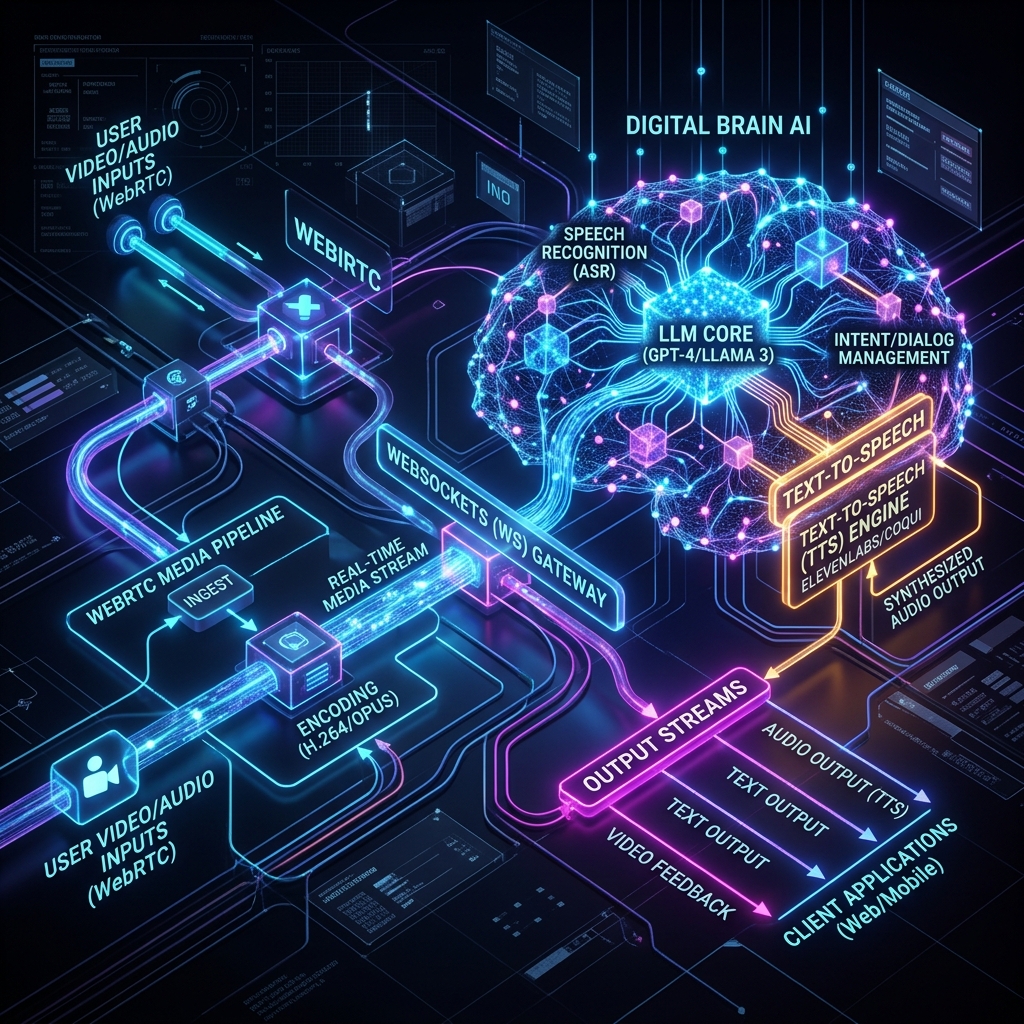
AI agents are shifting from passive chat interfaces to active, real-time participants in human workflows. One of the most challenging frontiers in this shift is building asynchronous AI copilots that operate over real-time media streams. A prime example is an automated video interview assistant: an agent that must listen to a candidate, analyze their speech and facial cues, refer to job criteria, and dynamically prompt or interact with the user, all while maintaining sub-second latency.
In this article, we dissect the end-to-end technical stack required to build such an assistant. We will cover real-time media ingestion, whisper-based transcription chunking, LLM orchestration, text-to-speech rendering, and network topology choices. If you are building voice-first or video-first AI copilots, this architecture represents a battle-tested blueprint.
High-Level System Architecture
To achieve sub-second latency, we cannot rely on standard HTTP request-response cycles. Instead, we must utilize a bidirectional, persistent connection. The user's browser establishes a WebRTC or WebSocket connection to our media gateway. The media gateway splits the stream into audio and video tracks, processing each in parallel pipelines.
Here is a conceptual flow of the media pipeline:
[Browser Client]
       |  (WebSockets / WebRTC Media Stream)
       v
[Media Gateway (Node.js/Fastify)]
  ---/       \---
  v             v
[Audio Pipeline]  [Video Frame Pipeline]
  |                 |
  v (100ms chunks)  v (Keyframe extraction)
[Whisper-Live]    [Computer Vision/ResNet]
  |                 |
  v (Text tokens)   v (Emotion/Context vectors)
[Agent Orchestrator (Gemini 2.5 Flash / Pro)]
  |
  +--> [Memory Context & RAG Database]
  |
  v (Streaming text response)
[TTS Engine (Deepgram/ElevenLabs)]
  |
  v (PCM Audio Buffers)
[Browser Client (Audio Playback Queue)]
Let's break down the implementation details of each layer in this architecture.
1. Media Ingestion: WebRTC vs. WebSockets
When capturing live audio and video from the client, we have two primary choices: WebRTC or binary WebSockets.
The Case for WebRTC
WebRTC is the gold standard for real-time video communications because it runs over UDP (via SRTP) and implements congestion control (GCC) to handle packet loss gracefully. If the network drops frames, WebRTC drops them and catches up, prioritizing latency over absolute frame delivery. However, terminating WebRTC in a Node.js or Python backend requires a media server like Janus, Mediasoup, or Pion (Go), which introduces operational complexity.
The Case for WebSockets
For many AI applications where reliability and simplified architecture are prioritized, binary WebSockets over TCP are a highly viable alternative. Audio is captured using the browser's AudioContext API, encoded as raw PCM or compressed via Opus, and sent in binary chunks (e.g., every 100ms) over a WebSocket connection. While TCP retries can cause latency spikes on poor connections, WebSockets are trivial to scale behind load balancers like Nginx or AWS ALB.
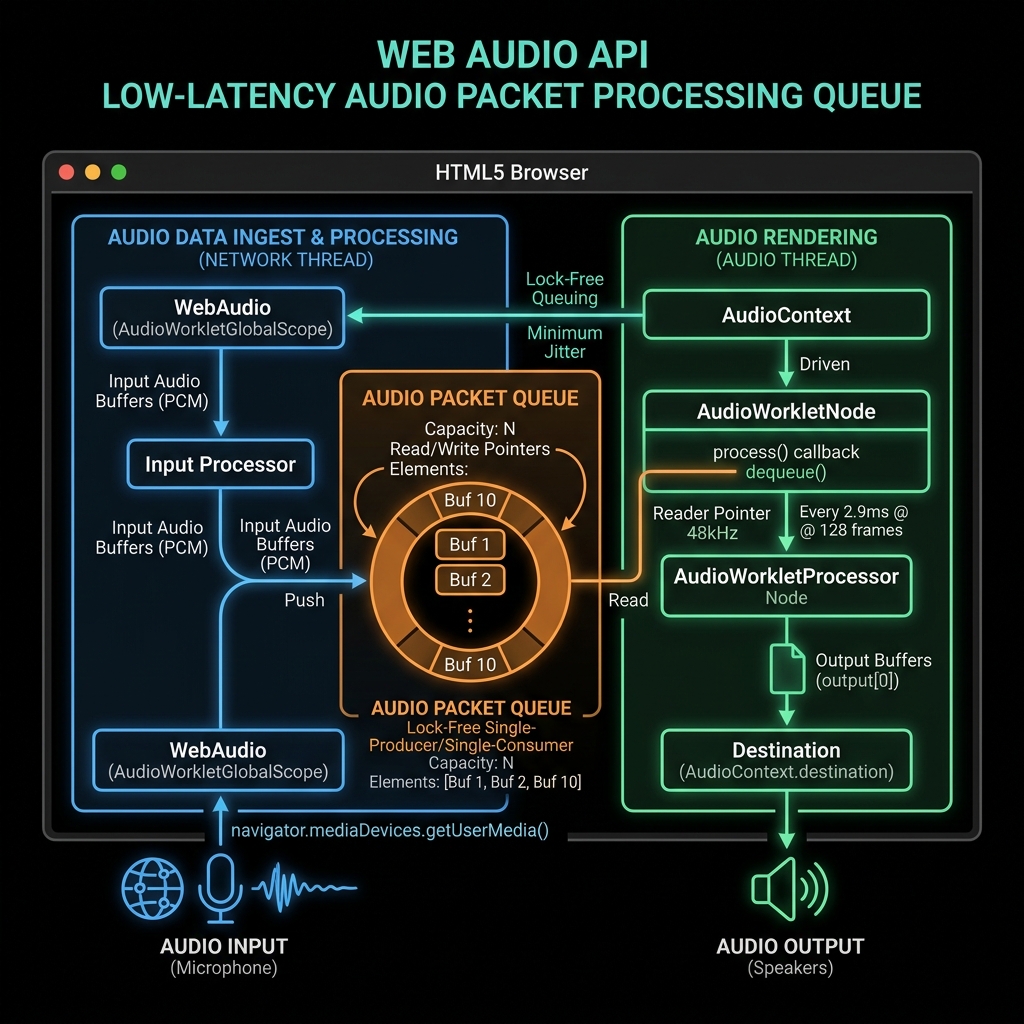
Below is an example of a Node.js WebSocket handler that ingests binary audio packets and feeds them into a transcription pipeline:
import { WebSocketServer, WebSocket } from 'ws';
import { TranscriptionPipeline } from './transcription';

const wss = new WebSocketServer({ port: 8080 });

wss.on('connection', (ws: WebSocket) => {
  console.log('Client connected to media stream');
  const transcriber = new TranscriptionPipeline();

  transcriber.on('transcript', (text: string, isFinal: boolean) => {
    // Send transcription back to client or forward to LLM agent
    ws.send(JSON.stringify({ type: 'transcript', text, isFinal }));
  });

  ws.on('message', (message: Buffer, isBinary: boolean) => {
    if (isBinary) {
      // Feed raw PCM 16-bit audio chunk into transcriber
      transcriber.writeAudioChunk(message);
    } else {
      const event = JSON.parse(message.toString());
      if (event.type === 'start') {
        transcriber.start(event.config);
      }
    }
  });
ws.on('close', () => { transcriber.destroy(); console.log('Client disconnected'); }); });
## 2. Low-Latency Transcription Pipeline

Once raw audio chunks arrive at the server, we must convert them to text as fast as possible. Using standard transcription APIs where you upload a complete file is out of the question. Instead, we run a streaming Whisper server.

We utilize a VAD (Voice Activity Detection) algorithm like **Silero VAD** in conjunction with **Whisper-live** or **Faster-Whisper**. The pipeline works as follows:
1. **Audio Accumulation:** Accumulate incoming audio bytes in a circular buffer.
2. **VAD Windowing:** Run VAD on the buffer every 30ms. If speech is detected, we keep accumulating.
3. **Interim Transcription:** Every 200–500ms during speech, feed the active segment to Whisper to get interim (unstable) results.
4. **Finalization:** When VAD detects a silence gap greater than 800ms, mark the segment as "final" and dispatch the complete sentence to the LLM agent.

By leveraging `Faster-Whisper` running on an NVIDIA TensorRT-LLM container, we can transcribe a 5-second sentence in under 150ms.

## 3. The Agent Reasoning Loop

When a finalized transcription block is produced, it is sent to the LLM agent orchestrator. The orchestrator cannot be a simple static prompt. In an interview setting, the agent needs to:
- Maintain a structured state (e.g., current question index, candidate's response completeness, remaining time).
- Access external documents (e.g., job description, grading rubrics) via Vector Search / Retrieval-Augmented Generation (RAG).
- Make real-time decisions (e.g., "Has the candidate fully answered the question, or should I prompt them for more detail?").

We utilize a state-machine wrapper around the LLM. In each loop step, we provide the model with the latest transcript, the structured session state, and system instructions directing it to output a JSON object containing the action to take:

```json
{
  "action": "PROMPT_CANDIDATE",
  "reasoning": "The candidate explained their experience with Kubernetes but did not address how they handle cluster-wide outages as asked.",
  "response_text": "That makes sense. Could you expand on a specific instance where you had to troubleshoot a production outage on Kubernetes?",
  "update_state": {
    "covered_topics": ["kubernetes_basics"],
    "pending_topics": ["incident_management"]
  }
}
By forcing structured JSON outputs, we ensure our application can update database states, trigger UI changes on the candidate's screen, and control the dialogue flow cleanly.
4. Text-to-Speech (TTS) and Synthesis Streaming
To make the assistant feel natural, the voice response must start playing back to the client within 300ms of the agent finishing its decision. We achieve this by streaming the output tokens from the LLM directly into the TTS engine.
Instead of waiting for the full LLM sentence to complete, we feed the token stream word-by-word into a websocket-based TTS API (like Deepgram Aura or ElevenLabs Turbo v2). The TTS engine synthesizes the audio chunks on the fly and streams raw PCM audio back to our server, which forwards it to the client over the client's WebSocket connection.
On the client side, we maintain a custom audio queue using the browser's Web Audio API. The queue concatenates incoming binary audio chunks and schedules them to play consecutively without audible gaps or clicks.
Latency Optimization Checklist
To build a truly seamless copilot, every millisecond counts. Here is how we optimize the pipeline to keep end-to-end response time under 1.2 seconds:
- Geographic Proximity: Deploy the WebSocket and Media servers close to the user (edge deployments or geo-routed AWS nodes) to minimize network round-trip time (RTT).
- Model Selection: Use fast models like Gemini 2.5 Flash for the conversational loop. Its massive speed advantage over larger models outweighs minor differences in reasoning for active dialogue.
- Hardware Acceleration: Run Whisper and LLM inferences on dedicated GPU nodes (e.g., NVIDIA A10G or L4) with optimized inference engines (TensorRT, vLLM).
- Stream Piping: Always pipeline the data.
Audio Chunk -> VAD -> Whisper -> LLM Token Stream -> TTS Audio Stream -> Client Speaker. Never wait for a block to finish before starting the next block's computation.
Conclusion
Building an asynchronous AI copilot requires a shift from web application paradigms to real-time systems engineering. By combining WebSocket media streams, streaming transcribers, structured LLM state loops, and piped text-to-speech engines, we can create AI assistants that feel like natural, responsive conversational partners.
At D613 Labs, we specialize in building these advanced agentic architectures. In our next posts, we will dive deeper into training custom VAD models and setting up local test harnesses for real-time audio systems.